
Security, Privacy, and Control Framework
Document Index – Cyber Security Team Review
This index is prepared for external use by the ClickLearn Cyber Security team. For detailed information or in-depth discussions about security controls, please contact ClickLearn’s security team via designated customer communication channels – security@clicklearn.com.
1.0 Purpose & Scope
The escalating frequency, sophistication, and consequences of cybersecurity threats underscore the necessity for robust security measures and effective data protection controls. In 2025, organizations reported an average of 1,925 to 1,984 weekly cyberattacks, a notable increase from previous years.
In response to these challenges, ClickLearn aligns its information security protocols with established industry standards and regulatory frameworks, including GDPR. The company’s security, privacy, and operational controls are structured to address contemporary enterprise risks while maintaining regulatory compliance and ensuring comprehensive data protection. This document outlines ClickLearn’s methodologies for managing security, privacy, and data protection.
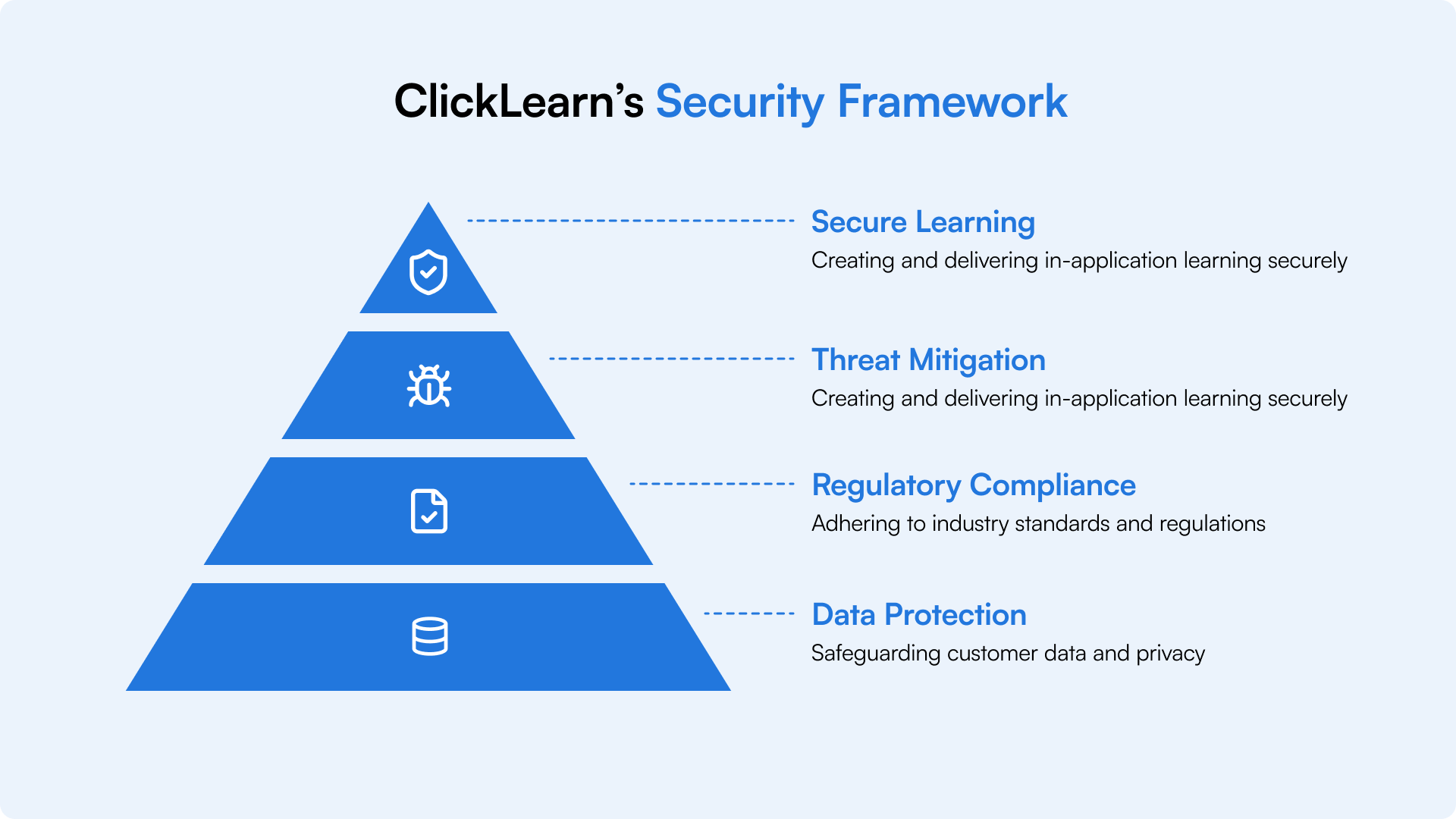
ClickLearn is purpose-built to enable organizations to securely develop and deliver in-application learning and guidance, while safeguarding customer data and ensuring regulatory compliance. Our security measures adhere to industry-leading standards and relevant data protection regulations, such as the General Data Protection Regulation (GDPR). This document outlines ClickLearn’s approach to data rotection, access management, infrastructure security, and incident monitoring. It is designed to facilitate customer due diligence by providing transparency regarding ClickLearn’s security framework, without disclosing sensitive implementation details.
2.0 About ClickLearn
ClickLearn is a comprehensive digital adoption and learning platform designed to enable organizations to create, manage, and deliver in-application guidance and training materials directly within their business systems. ClickLearn allows clients to develop step-by-step instructions, tutorials, and contextual support to facilitate user onboarding, ongoing training, and sustained engagement with enterprise applications. ClickLearn automatically generates training resources in seven distinct formats, including narrated videos, PDF documents, classroom presentations, and an interactive live assistant embedded within the business environment. The platform provides fast, accurate, and current content tailored to corporate standards.
3.0 Executive Summary and Trust Commitments
ClickLearn implements comprehensive security measures to protect customer data, utilizing AES-256 encryption both at rest and during transmission, with a minimum standard of TLS 1.2 or above. Encryption keys are securely managed and regularly rotated through Azure Key Vault. The platform is distributed across several Azure regions, offering inherent resilience and DDoS protection to maintain high availability and scalability.

ClickLearn complies with GDPR standards, integrating Privacy by Design and Default into all processes and systems. The organization maintains a comprehensive incident response plan, supported by cybersecurity insurance and established escalation protocols. Security practices are regularly evaluated through annual internal assessments. Secure development is ensured by adherence to OWASP Top 10 guidelines, automated code scanning, and peer reviews. Customer data stored in ClickLearn Cloud is backed up daily by Microsoft and actively monitored by ClickLearn IT personnel.
4.0 Platform Overview and Data Lifecycle
ClickLearn is a digital adoption and learning platform that delivers in-application guidance and learning content through on-premises, hybrid, and cloud deployment options, allowing customers to select the environment best
suited for content creation, storage, and access. Content in ClickLearnCloud on Microsoft Azure, ensuring that all data is transmitted securely via encrypted HTTPS connections through Azure firewalls. ClickLearn functions as a desktop application, complemented by a browser extension, to record and generate learning content. Recordings are
executed locally within the application, eliminating the need for APIs or integrations with the customer’s internal systems. End users who solely consume published content are not required to install the desktop application.
Content stored either on-premises or within ClickLearnCloud is delivered securely to end users via the ClickLearn learning portal or in-application guidance, according to the selected deployment model. Access to content is governed by customer-defined permissions and authentication protocols, ensuring only authorized individuals can view published guidance.
All content delivery utilizes encrypted HTTPS connections to safeguard data during transmission. Customers maintain full ownership of their content and exercise control over its publication and accessibility. The personal data processed by ClickLearn is strictly limited to that required for authentication, access control, and service provision, in alignment with data minimization principles.
Customer data held in ClickLearnCloud is backed up daily by Microsoft and is automatically deleted 90 days following contract termination, whereas on-premises data remains under the complete control of the customer. ClickLearn complies with privacy-by-design and GDPR requirements, supported by regular risk assessments, access reviews, and established incident response procedures.
ClickLearn employs an advanced and reliable strategy for database and storage management via its managed file-
version handling features. The platform consistently preserves a thorough revision history, enabling accurate tracking and documentation of all modifications. Through automated control of stored file versions as an integral component of routine operations, ClickLearn improves both system performance and reliability. This process guarantees users continuous access to the latest authorized content, while also facilitating efficient resource usage and compliance with organizational standards.
5.0 Deployment Models
Hybrid
Cloud
Content Storage
Customer infrastructure
Customer choice: On-
premises or ClickLearnCloud
ClickLearnCloud (Microsoft Azure)
Content
Processing
Entirely within customer environment
Customer choice: Local or Azure
Microsoft Azure
Data Transmission
Internal network only
Encrypted HTTPS via Azure firewalls
Encrypted HTTPS via Azure firewalls
Content Delivery
Portal or in-app (customer network)
Portal or in-app (flexible)
Portal or in-app (cloud-based)
Data Backup
Customer responsibility
Customer (on-prem) or Microsoft daily (cloud)
Microsoft daily backups
Data Residency
Customer-controlled
Customer choice
Customer-selected Azure region selected during on-boarding
Access Control
Customer-defined permissions
Customer-defined permissions
Customer-defined permissions
Data Retention
Customer-controlled
Customer (on-prem) or 90-day deletion (cloud)
90-day deletion after termination
Encryption
Customer-managed
Customer (on-prem) or AES-256/min TLS 1.2/1.3 (cloud)
AES-256 at rest, min TLS
1.2/1.3 in transit
6.0 Hosting, Regions, and Data Residency
ClickLearn services are hosted on Microsoft Azure in regions selected by customers during onboarding, including West Europe (EU/EEA), United States (North Central), Canada (Central), and Australia (Australia East). This approach ensures data residency by maintaining customer data within the designated geographic area. Azure delivers robust infrastructure with automated scaling, monitoring, high availability, and fault tolerance. Cross-border data transfers are limited to necessary cases and are managed according to contractual and regulatory requirements. All hosting and processing adhere to GDPR and relevant data protection legislation.
Azure Region Data Residency
Customer-Selected Region
West Europe
United States
Canada
Australia
Azure Region Location
West Europe (Netherlands)
North Central US (Illinois)
Canada Central (Toronto)
Australia East (New South Wales)
Risk Assessment
EU / EEA
United States
Canada
Australia
Data Residency Assurance
Customer data is stored and processed within the European data centers
Customer data
remains within U.S. data centers
Customer data remains within Canadian data centers
Customer data remains within Australian data centers

- Resilient Infrastructure: Azure provides resilient infrastructure, automated scaling, monitoring, high availability, and fault tolerance.
- Data Residency: Cross-border data transfers are avoided unless necessary and are governed by contractual and regulatory safeguards.
- Compliance: All hosting and processing align with GDPR and applicable data protection law.
7.0 Tenant Isolation and Multi-Tenant Architecture

ClickLearn utilises a secure multi-tenant architecture, with each client allocated a logically isolated tenant. Access controls are tenant-aware; authorisations are role-based, and boundaries are strictly defined to mitigate cross-tenant data exposure risks. Customer data is systematically partitioned and securely stored within Microsoft Azure, with optional additional isolation available via dedicated Azure SQL databases and Azure Blob Storage, an advanced solution for managing substantial volumes of unstructured content, including text, images, videos, and backups. All data is encrypted both in transit and at rest using AES-256 protocols, supported by logical separation, continuous monitoring, and robust deployment practices. The platform adheres to privacy-by-design principles, data minimisation strategies, and GDPR-compliant data protection standards throughout its operations.
8.0 Encryption and Key Management
ClickLearn safeguards customer data through robust, industry-standard encryption technologies during both transit and storage. Data transmitted is protected by TLS 1.2 or above, and information stored within Microsoft Azure is encrypted at rest utilizing AES-256 via Azure Storage Service Encryption. The processes of encryption, decryption, and key management are performed seamlessly through Microsoft-managed encryption solutions, providing secure and consistent protection without necessitating customer intervention. Encryption keys are maintained securely in Azure Key Vault and access is restricted to authorized ClickLearn key personnel. Keys undergo automated rotation at predetermined intervals, and certificate and key lifecycle management adhere to Microsoft Azure security best practices, ensuring the confidentiality, integrity, and regulatory compliance of customer data.

9.0 Identity and Access Management
ClickLearn provides a range of authentication methods for secure access to the application and content, including ClickLearn Login and integration with third-party identity providers such as Microsoft Office 365, LinkedIn, Google (Gmail), Facebook. The user can authenticate via OpenID when viewing content. Users authorize access to essential identity details (such as name and email address), and the ClickLearn customer care team assists with integration support.

Platform access is controlled through role-based access control (RBAC) and the principle of least privilege. Each customer designates a Customer Administrator responsible for managing additional administrators, Author Users, and Content Users, with detailed permissions implemented at the content level. Authentication and access events are systematically logged to ensure auditability, and all permissions are confined to the ClickLearn application, managed via the chosen identity provider.
The application provides comprehensive user action tracking, allowing customers to monitor and analyze patterns of content usage. Customers may utilize Google Analytics, SharePoint (with event data recorded in SharePoint lists), or ClickLearn’s native tracking solution, which offers data access through OData for integration with applications such as Excel.

ClickLearn enforces a mandatory password policy stipulating that passwords must contain a minimum of six characters, with at least one uppercase letter, one lowercase letter, and one numerical digit. The use of certain special characters is restricted. This policy is managed exclusively by ClickLearn and cannot be configured by customers.
Password Policy: ClickLearn employs a mandatory password policy requiring a minimum of six characters, including at least one uppercase character, one lowercase character, and one numeric digit. Certain special characters are prohibited. This policy is administered by ClickLearn and is not customer-configured.
10.0 Internal Access Control and Workforce Security
ClickLearn enforces robust internal access controls and workforce security protocols to safeguard systems and data. Employees participate in comprehensive HR onboarding and undergo thorough background verification before receiving system access privileges. Endpoint security is centrally managed through Microsoft Intune, which delivers device encryption, stringent authentication standards, compliance monitoring, and remote wipe capabilities.
All IT systems are equipped with industry-standard antivirus software and full disk encryption. ClickLearn maintains a comprehensive and current inventory of assets and devices that access corporate resources. Access to production infrastructure and customer data is strictly limited to authorized personnel in accordance with established roles and responsibilities, upholding the principle of least privilege.
Administrative access is consistently logged, monitored, and subject to regular review. Physical security measures, including biometric authentication, are applied to all individuals entering office facilities and selecting staff accessing sensitive locations such as server rooms.
Formal offboarding procedures ensure prompt revocation of access when employees leave or transition roles.
Security awareness training is required for all staff, with specialized training delivered to engineering and support teams responsible for handling customer data and interacting with production systems.
Wireless network access at ClickLearn offices is exclusively available to authorized personnel engaged in approved business operations. Corporate wireless networks utilize advanced authentication protocols and are centrally administered and monitored to detect any unauthorized access, misuse, or unusual activity. Guest and unmanaged devices are segregated from corporate systems, and wireless access controls undergo regular review to maintain compliance with ClickLearn’s security standards.
Characteristic
Denmark (DK)
United States (US)
India (IN)
Australia (AU)
Physical Data Centre
No
No
No
No
Hosting Location
Microsoft Azure Cloud Datacenter
Microsoft Azure Cloud Datacenter
Microsoft Azure Cloud Datacenter
Microsoft Azure Cloud Datacenter
Physical Access Controls
Key card / access code required
Key card / access code required
Authorized
personnel only
Key card / access code required
Environmental / Facility Controls
Alarm system, UPS on servers
Alarm system
Alarm system, Redundant power, cooling system
Alarm system
Third-Party Access
External consultants under NDA
External consultants under NDA
External consultants under NDA
External consultants under NDA
Hardware Disposal
Secure erase or
shredding procedure
Not applicable
Secure disposal procedure followed
Not applicable
Disaster Recovery
DR plan in place and tested at least annually
DR plan in place and tested at least annually
DR plan in place and tested at least annually
DR plan in place and tested at least annually
11.0 Network Security and Segmentation

12.0 Vulnerability Management and Patch Management

ClickLearn operates an extensive vulnerability management program that proactively identifies, evaluates, and addresses security weaknesses in a timely manner. This program incorporates regular vulnerability scans across systems and applications, with remediation efforts focused on critical and high-severity vulnerabilities based on risk and exploitability assessments. The organization follows a disciplined patch management process, ensuring that security updates are applied to production environments in accordance with established service level objectives determined by vulnerability severity.
Microsoft Azure-managed services benefit from automated patching provided by Microsoft, guaranteeing that security updates are deployed promptly. ClickLearn performs annual internal penetration tests aligned with the OWASP framework to identify potential vulnerabilities and assess the effectiveness of existing security controls. Findings from vulnerability assessments and penetration testing are systematically tracked, remediated, and reviewed as part of ongoing initiatives to strengthen security posture.
Program Components
Component
Description
Frequency / Timing
Vulnerability Scanning
Regular scanning of systems and applications to identify security weaknesses
Continuous / Regular intervals
Risk Assessment
Critical and high-severity vulnerabilities prioritized based on risk and exploitability
Per vulnerability discovery
Patch Management
Structured process for applying security updates to production systems
3-4 Weeks
Azure Auto-Patching
Automatic patching for Microsoft Azure-managed services
Managed by Microsoft
Penetration Testing
Internal assessments aligned with OWASP framework to validate security controls
Annual
Findings Tracking
Systematic tracking, remediation, and review of all identified vulnerabilities
Continuous
Security Improvement
Ongoing review and enhancement of security controls based on assessment findings
Continuous
13.0 Logging, Monitoring, and Alerting
14.0 Backup and Disaster Recovery

ClickLearn offers comprehensive backup and disaster recovery solutions designed to ensure uninterrupted business operations and reliable data access. Customer information hosted on ClickLearnCloud is backed up daily through Microsoft Azure’s automated services, with retention periods managed according to established policies. Backup data is encrypted during transmission and while stored and is kept in geographically distinct Azure regions to mitigate risks associated with regional outages.
ClickLearn regularly conducts backup restoration tests to verify its recovery procedures and ensure data can be restored within the defined recovery time objectives (RTOs), which are set at 24 hours for both RTO and RPO. In the event of a disaster or significant service interruption, ClickLearn adheres to documented disaster recovery protocols to restore functionality and reduce customer impact. For on-premises implementations, backup and recovery responsibilities rest with the customer, following the shared responsibility framework.
15.0 Change Management and Release Processes

ClickLearn adheres to a rigorous change management protocol designed to ensure all modifications to production systems are thoroughly evaluated, tested, approved, and documented prior to deployment. Every change is subject to review and authorization by designated stakeholders, accompanied by risk assessments for those deemed to have a high impact. Testing is conducted within non-production environments including development and staging before any release to the live environment.
A dedicated Quality Assurance and Support team carries out systematic testing procedures across all regions as part of the release management process. Emergency changes are handled through an expedited approval workflow, while still maintaining comprehensive documentation and post-implementation reviews. ClickLearn maintains a detailed change log to record all production changes, thereby reinforcing auditability and facilitating root cause analysis in the event of incidents.
16.0 Application Security and Secure Development Practices

ClickLearn incorporates security throughout the software development lifecycle (SDLC) by employing secure coding standards, conducting code reviews, and utilizing automated security testing. Engineering staff receive targeted secure coding training to recognize and mitigate common vulnerabilities, including those identified in the OWASP Top 10. All code modifications undergo peer review with explicit attention to security considerations prior to integration into the main codebase. ClickLearn performs annual internal penetration assessments consistent with the OWASP framework to verify application security controls and uncover potential vulnerabilities. Security testing findings are systematically prioritized, remediated, and monitored to resolution. The organization maintains a formal vulnerability disclosure process, allowing customers to report potential issues in a responsible manner. Customers interested in conducting independent penetration testing must complete a pre-engagement document available upon request which requires approval prior to initiating any testing activities.
17.0 Privacy, GDPR, and Global Data Protection

ClickLearn complies with GDPR requirements and is dedicated to safeguarding customer data. The company implements Privacy by Design and Default principles as recommended by the European Data Protection Board. As a data processor, ClickLearn processes personal data exclusively on behalf of its customers, who serve as data controllers.
Robust technical and organizational measures are in place, including scheduled access reviews, information
classification protocols, and risk assessments, all conducted within an annual compliance review cycle according to the nature and risk level of processing activities.
ClickLearn upholds data subject rights including access, rectification, and deletion through established internal procedures and collaboration with customers functioning as controllers. A documented incident and breach response plan ensures prompt action and notification as required, with policy updates following any incident. ClickLearn’s privacy and data protection commitments are defined in its Data Processing Addendum (DPA). For privacy-related inquiries, contact dataprotection@clicklearn.com.
18.0 Third-Party and Sub-processors Risk Management
ClickLearn maintains a comprehensive third-party and subprocessor risk management program to safeguard customer data. All subprocessors engaged by ClickLearn operate under a legally binding Data Processing Agreement (DPA), which contains provisions to address unauthorized or unlawful data processing. As part of its annual
compliance review cycle, ClickLearn conducts risk-based assessments of all third-party vendors. Vendors are required to participate in information security and privacy awareness training tailored to their specific roles and responsibilities. ClickLearn observes Privacy by Design and Default principles, reinforced by routine information classification reviews and continuous controls that regulate work-related access to systems handling personal data.
19.0 Software Release Cycle and Environment Separation

ClickLearn maintains a rigorous separation between development, staging, and pre-production environments, facilitating thorough validation of all changes before deployment and reducing the risk of disruptions to live systems. The application is consistently tested within non-production environments, where the dedicated Quality Assurance and Support team conducts systematic test routines across all regions as part of the release management process. In accordance with ClickLearn’s Terms and Conditions, customers must use only synthetic test data; production or personal information is strictly prohibited in non-production environments. This approach supports secure development practices, enhances data protection, and ensures controlled implementation of updates to production systems.
20.0 Incident Response and Customer Communications
ClickLearn adheres to a comprehensive incident and breach response policy that facilitates efficient identification, evaluation, and management of security events. The internal security team is designated to oversee incident triage, conduct investigations, preserve evidence, and coordinate response efforts, with established escalation procedures to engage technical and engineering teams when necessary. In the case of a security or data breach, ClickLearn ensures timely notification of relevant stakeholders, aligning with contractual and regulatory obligations.

After any incident occurs, ClickLearn initiates a post-incident review to determine root causes, implement corrective actions, and revise relevant policies and procedures based on learned insights. Daily triage meetings are held to examine incoming items, including customer-reported issues and identified bugs. During these meetings, each item is evaluated and allocated either to the Emergency Queue or the Product Backlog (PBI). The team establishes severity and priority for each item to facilitate prompt and effective resolution.
To reinforce this process, ClickLearn conducts annual security risk assessments and internal penetration tests in accordance with the OWASP framework, promoting continuous enhancement of detection and response capabilities. Customer incidents and inquiries are managed through a unified support channel, ensuring consistent communication and coordinated resolution efforts.
21.0 Employee Security Awareness and Training

ClickLearn delivers comprehensive security awareness training for all personnel, incorporating obligatory annual sessions and policy evaluations. Role-specific security and privacy instruction is provided according to staff duties, including secure coding education for engineering teams. Phishing awareness initiatives, such as simulated phishing campaigns, are conducted to strengthen vigilance. Training completion is monitored through established metrics to ensure regulatory compliance and support ongoing enhancement efforts.
22.0 Customer Responsibilities and Configuration Best Practices
ClickLearn follows a shared responsibility model, prioritizing application security and leveraging Microsoft Azure
services to deliver ClickLearn Cloud to its clients. Customers are responsible for configuring authentication, access controls, and user management. ClickLearn accommodates multiple authentication options, including ClickLearn Login and third-party identity providers such as Office 365, LinkedIn, Gmail, and Facebook. Access by these providers is contingent upon customer consent, permitting the ClickLearn application and its content to retrieve user information specifically email address and full name, where available.
It is incumbent upon customers to implement effective identity controls, including SSO and MFA, via their selected identity provider. Users may authenticate using OpenID when accessing content. Customers must establish and maintain role-based access controls by assigning roles (Customer Administrator, Author User, Content User) and apply granular permissions to uphold principles of least privilege and data minimization. Regular review of user roles, restriction of content exports when necessary, and adherence to a security configuration checklist during onboarding in collaboration with ClickLearn Customer Care are strongly recommended.
Customer Responsibilities
Shared Responsibilities
ClickLearn Responsibilities
Configure authentication methods
Identity provider integration support
Application security controls
Choose identity providers
Authentication setup guidance
Microsoft Azure service utilization
Grant consent for application access
Technical assistance during configuration
ClickLearn Cloud infrastructure protection
Implement SSO/MFA through identity provider
Security best practices documentation
Data encryption at rest (AES-256)
Manage user identities and credentials
Internal assessments aligned with OWASP framework to validate security controls
Data encryption in transit (TLS 1.2/1.3)
Design role-based access control structure
Training and onboarding support
Secure data handling and processing
Assign user roles (Admin, Author, Content User)
Security checklist coordination
Support multiple authentication methods
Apply granular permissions
Customer Care team assistance
Provide ClickLearn Login capability
GDPR alignment guidance
Enable third-party identity provider integration
Regular user role reviews
Data minimization practices
Define role framework (Admin, Author, Content User)
Restrict content exports where applicable
Privacy-by-design support
Provide permission management system
Follow security configuration checklist
Compliance framework guidance
OpenID authentication support
Coordinate with ClickLearn
Customer Care during onboarding
GDPR compliance maintenance
Maintain security posture
Security standards adherence
23.0 Responding to Customer Questionnaires and Concerns
ClickLearn manages customer security inquiries through a systematic process, utilizing its Security FAQ and providing formal responses to Requests for Information. The company communicates security incidents or pertinent updates to customers via established channels. To maintain security integrity, penetration test reports are not shared. Customers interested in conducting independent penetration testing must complete a pre-engagement document available upon request which requires approval prior to initiating any testing activities.
24.0 AI Security and Privacy
ClickLearn AI is available as an optional feature within the licensed platform and may be activated or deactivated at the customer’s discretion. The AI framework utilizes a retrieval exclusively accessing customer-configured private data sources, without reliance on public datasets, third-party information, or cross-tenant data. Data source access is managed through authenticated configurations and permission-based controls. ClickLearn adheres to privacy-by-design and data protection protocols, including ongoing access reviews, robust information classification measures, and established incident response strategies. In the event of a security breach, impacted parties are notified according to defined breach management procedures. ClickLearn also enables customers to establish standard guidelines for transparent and responsible AI use, which are presented to end users during AI interactions.
25.0 ISO 27001/SOC 2 Certification Roadmap
ClickLearnCloud is fully hosted on Microsoft Azure, leveraging Microsoft’s compliance certifications for infrastructure-level controls. Microsoft Azure holds SOC 1, SOC 2 Type 2, ISO 27001, and various other compliance certifications, which encompass the underlying infrastructure and services supporting ClickLearnCloud.
ClickLearn systematically aligns its security and compliance initiatives with industry-recognized frameworks, including ISO/IEC 27001. Although formal certification or attestation has not yet been obtained, ClickLearn is actively preparing to pursue certifications such as ISO 27001 or SOC 2 in alignment with its strategic compliance roadmap. While the timeline for certification is still under consideration, ClickLearn remains fully dedicated to achieving these milestones and consistently enhancing its security governance in accordance with established industry best practices.
26.0 Contact Information and Trust Center
For inquiries, support requests, or further details concerning ClickLearn’s security practices and data protection policies, please consult the contacts and resources listed below.
Category
Contact / Reference
Notes
Data Processing Agreement
Legal and Integral
documentation
Cyber Insurance
Insurance information
27.0 Appendix - Governance Overview and External Sharing Policy
This appendix presents an executive summary of ClickLearn’s governance framework, internal controls, and protocols for external information dissemination. ClickLearn adheres to robust internal policies and procedures and maintains documentation and evidence to demonstrate its commitment to security governance, regulatory compliance, and operational resilience. Consistent with industry standards and security requirements, certain internal documents and evidentiary materials are withheld from external distribution.
Area
Governance Overview
External Sharing
Third-Party & Sub-processors
Approved sub-processors are engaged under lawful Data Processing Agreements (DPAs) covering confidentiality, data protection, and restrictions on unauthorized processing. Vendors are reviewed annually as part of ClickLearn’s risk-based vendor assessment cycle.
Sub-processor agreements and comprehensive lists are provided to external parties.
Security & Penetration Assessments
ClickLearn conducts annual internal security and
penetration-style assessments aligned with the OWASP framework. Findings are risk-assessed, prioritized by severity, and remediated under management oversight.
Customers are not provided with detailed testing reports or remediation plans.
Policy Framework
ClickLearn maintains internal policies covering Information Security, Access Control, Incident Response, BC/DR, Secure SDLC, and Vendor Risk Management, including defined roles, governance, and review of cadence.
Complete policy documents are intended for internal use only.
Data Retention & Deletion
Customer data stored in ClickLearnCloud is retained per contract and automatically deleted 90 days after contract termination. Internal retention schedules and procedures are documented and enforced.
Internal retention protocols are not disclosed to external parties.
Availability & Resilience Oversight
ClickLearn operates a multi-region cloud architecture with internal monitoring of availability, performance, and capacity to support service reliability.
Uptime metrics are
presented to customers.
Evidence & Control Validation
ClickLearn maintains internal evidence such as access reviews, backup monitoring, security training records, and change management approvals for governance and audit purposes.
Evidence of artifacts are not provided to customers.
Key Principles:
- Confidentiality and Security: Internal documentation including vulnerability reports, policy details, and procedural records is not shared externally, ensuring the protection of confidential information and preservation of security standards
- Transparency and Assurance: ClickLearn furnishes customers with high-level summaries, standardized security documents, and responses to formal questionnaires, evidencing compliance and security maturity while safeguarding operational confidentiality.
- Governance and Oversight: Internal controls, policies, and supporting evidence undergo ongoing review, management oversight, and continuous refinement to maintain consistency with industry standards and regulatory obligations.
- Customer Collaboration: ClickLearn collaborates with customers through established channels to address security inquiries, support compliance reviews, and facilitate audits on a case-by-case basis, subject to appropriate confidentiality agreements.
Note: This appendix is prepared for external distribution and presents an overview of ClickLearn’s governance framework. For detailed information or in-depth discussions about security controls, please reach out to ClickLearn’s security team via the designated customer communication channels.