


Key Takeaways
The blog post emphasizes the critical importance of maintaining strong, up-to-date SAP S/4HANA documentation throughout ERP transformations. It highlights that without a cohesive documentation strategy, organizations may face increased confusion, repetitive support requests, and hindered user adoption. Key issues such as outdated documents, scattered resources, and lack of ownership can lead to significant setbacks during implementations. The content also presents the implications of poor documentation, citing that 55% to 75% of ERP projects fail to meet expectations primarily due to inadequate documentation and training. It advocates for addressing these challenges early to build a robust foundation for scalable SAP documentation management.
Action Items
- Centralize all documentation in a single hub for easier access and consistency.
- Utilize tools that automatically update documentation as processes change.
- Embed contextual guidance within workflows to enhance user training.
- Create role-specific access and learning paths for targeted training.
- Plan for scalability and localization to accommodate growing organizational needs.
SAP S/4HANA Documentation: In the rush of configurations, data migration, and testing, documentation management often slips down the priority list. Without consistent, up-to-date SAP S/4HANA Documentation, even the best-planned ERP transformation faces confusion, repetitive support requests, and slower user adoption.
It starts slowly. A few Word docs here, some training decks there. Maybe a SharePoint folder filled with screenshots from a previous version. Before long, support teams are overwhelmed with repeat questions, users are confused about which process to follow, and productivity stalls during critical phases like go-live and hypercare. This is a classic sign of weak SAP S/4HANA Documentation.
It’s a challenge many organisations face, often without realising how much it holds them back.
Without a clear SAP S/4HANA Documentation plan, even the best system design can fall short of its potential. Strong documentation turns your SAP S/4HANA rollout from a technical upgrade into an organisation-wide success story.
What Causes Documentation Issues in SAP Rollouts?
As your SAP S/4HANA rollout gains pace, documentation gaps in SAP projects often appear quietly – scattered files, conflicting versions, and no single owner.
One team stores Word files, another keeps slides in shared folders, and someone else relies on screenshots from an older version. With no single source of truth, end-users hesitate, support requests increase, and productivity slows.
Outdated and Conflicting Documents
When system changes outpace documentation updates, users end up following old instructions. This mismatch leads to data errors, rework and reduced confidence in the new SAP system.
Scattered Resources Across Teams
Guides, slides, and process notes stored in different locations mean every department follows its own version of “how things work.” Without centralization, consistency becomes nearly impossible.
Missing Version Control and Ownership
Many projects lack a clear owner for documentation upkeep. Without review cycles or governance, updates get missed, and outdated materials linger across platforms.
Knowledge Loss During Transitions
When key contributors move on or change roles, their know-how often leaves with them. In many SAP environments, this is known as tribal knowledge – valuable experience that lives in people’s heads instead of structured documentation. Without a proper documentation management system, that knowledge is rarely captured or reused, leading to repeated mistakes and slower onboarding.
Key Takeaway
Documentation challenges in SAP projects arise when process guides are inconsistent, outdated, or lack ownership. By addressing these issues early, organisations can avoid documentation chaos as systems evolve and build a foundation for accurate, scalable SAP documentation management.
According to Gartner, nearly 55% to 75% of ERP projects fail to meet expectations, and poor documentation and training are often major contributors. Strong documentation management is not just administrative, it’s a key driver of adoption success.
How Documentation Challenges Differ for Greenfield and Brownfield
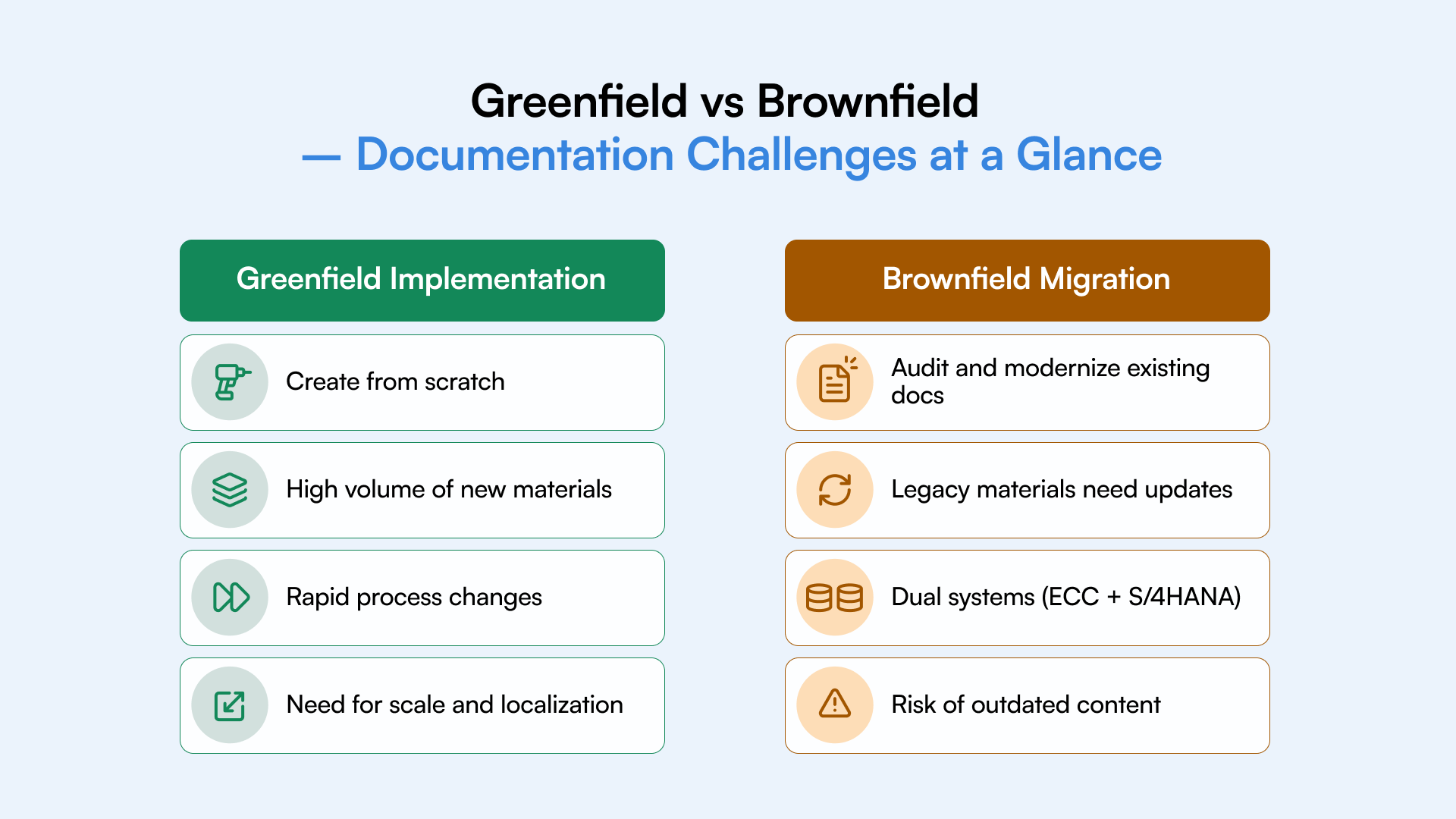
The nature of SAP documentation depends on your implementation path. In a SAP Greenfield implementation, you’re creating everything new, processes, data flows, and user guides. In a SAP Brownfield conversion, you must modernize and align existing materials with S/4HANA workflows. Each approach requires different documentation best practices and tools to stay accurate during transformation.
Greenfield: A Blank Slate with Hidden Pressure
Starting from scratch sounds liberating. In a Greenfield implementation, there’s no legacy clutter, no outdated materials, and no inherited issues. But that blank slate comes with pressure. Every process, role, and scenario needs new SAP project documentation.
As processes evolve during design and testing, teams race to capture updates and translate them into learning materials. Without a structured documentation plan, content quickly becomes outdated. The challenge isn’t just creating documentation – it’s keeping it alive as the system evolves and matures.
Key pain points:
- Building all documentation from the ground up
- Adapting content to constant process changes
- Delivering training across multiple roles and teams at once
Brownfield: Legacy Baggage Meets Modern Systems
In a Brownfield conversion, you’re not starting fresh – you’re evolving what already exists. That can save time, but it also brings hidden documentation challenges. Legacy materials often don’t match the new workflows in SAP S/4HANA, leaving teams unsure which version to follow.
Users might rely on outdated PDFs or guides that no longer reflect how the system behaves. Hybrid environments, where ECC and S/4HANA run in parallel, add to the confusion. Documentation must bridge both systems clearly, helping users unlearn old habits while adapting to the new interface.
Common issues:
- Outdated or conflicting legacy materials
- Inconsistent documentation across teams
- Resistance from users attached to old processes
Key Takeaway
A SAP Greenfield implementation demands creating comprehensive documentation from scratch, while a SAP Brownfield conversion focuses on updating legacy materials. Following SAP documentation best practices ensures both projects deliver consistent training content and support faster user adoption.
How Documentation Challenges Differ for Greenfield and Brownfield
The nature of SAP documentation depends on your implementation path. In a SAP Greenfield implementation, you’re creating everything new, processes, data flows, and user guides. In a SAP Brownfield conversion, you must modernize and align existing materials with S/4HANA workflows. Each approach requires different documentation best practices and tools to stay accurate during transformation.
When documentation is clear, your teams stay connected
Instead of scattered files or old versions sitting in shared drives, end-users access a single, trusted source for every process and update. They don’t waste hours searching for answers or switching between outdated training decks.
Consistency replaces confusion
Good documentation ensures everyone follows the same steps, whether it’s a finance workflow or a warehouse process. That alignment minimises errors and makes user adoption easier across departments.
Support teams get their time back
With accurate, self-service resources available, help desks spend less time resolving basic questions. This reduces dependency on IT and creates space for higher-value work.
Productivity rises across the board
When employees know where to find reliable training documentation, they work faster, make fewer mistakes, and stay confident during go-live and hypercare stages. Over time, this compounds into measurable efficiency gains.
Faster adoption, higher ROI
Research consistently shows that poor documentation and training are among the main reasons ERP projects exceed budgets and timelines. Strong SAP documentation best practices protect that investment, helping your project stay on schedule, under budget, and aligned with business goals.
Key Takeaway: Clear, consistent documentation reduces confusion, speeds up onboarding, and strengthens SAP user adoption. When training materials align with live processes, productivity rises and your S/4HANA migration delivers lasting business impact.
How to Build a Future-Ready SAP Documentation Strategy
A strong documentation strategy transforms static manuals into living assets. With SAP documentation automation, teams can record workflows once, auto-update them as processes evolve, and maintain a single source of truth throughout the SAP S/4HANA migration.
Below are five practical steps to help you create documentation that stays accurate, accessible, and impactful.
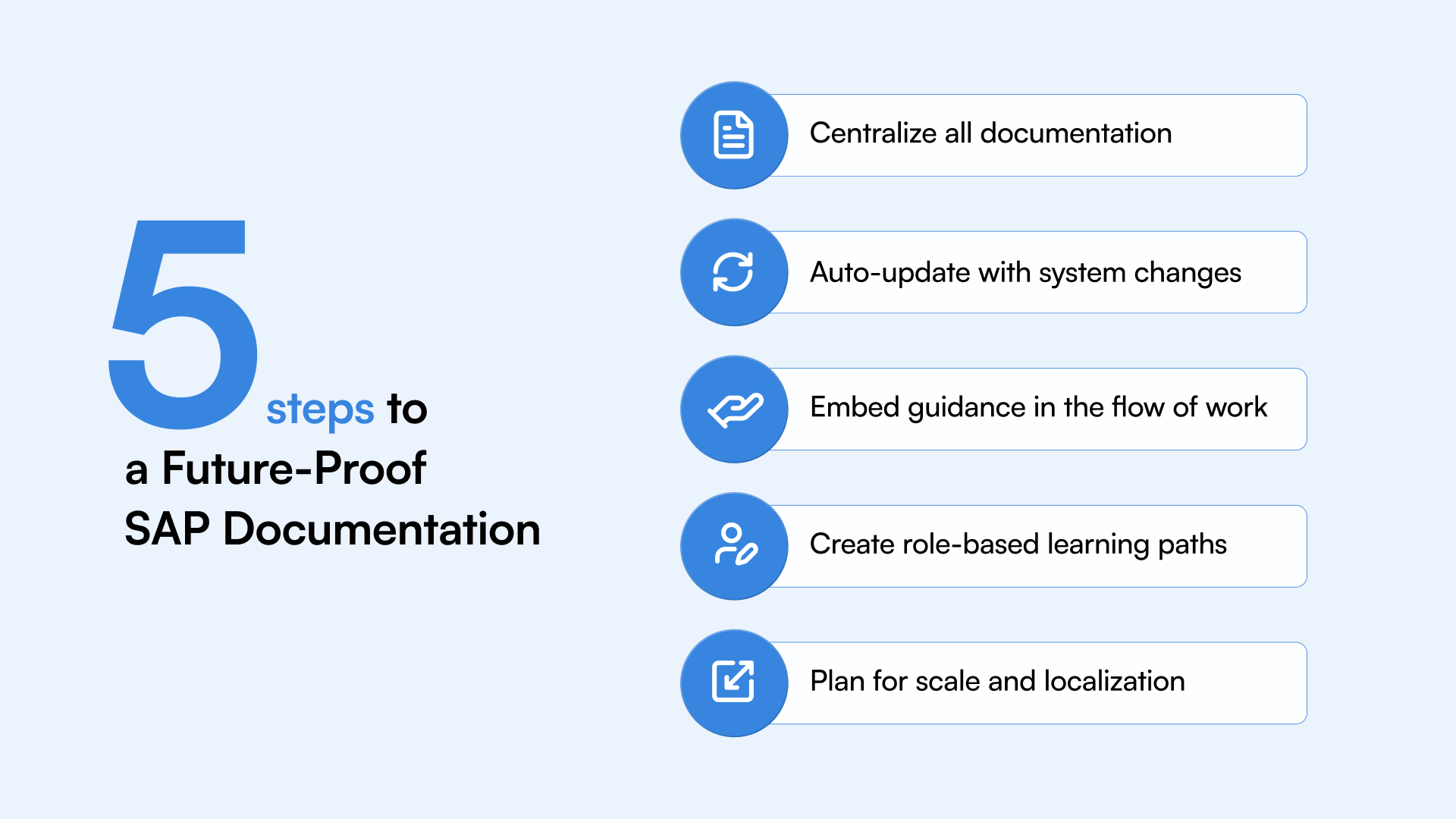
1. Centralize All Documentation
Bring every process guide, policy, and training resource together in one place. A centralized documentation hub makes it easier for users to find what they need and ensures that everyone follows the same version of every process.
Tip: Use metadata or tags so employees can filter content by department, task, or role. This helps teams spend less time searching and more time doing.
2. Use Tools That Auto-Update with Process Changes
Manual updates don’t scale in SAP S/4HANA projects. As workflows evolve, your documentation should evolve too. Tools with SAP documentation automation capture real user interactions, detect changes, and refresh content instantly – eliminating outdated guides and version conflicts.
Value insight: Auto-updated SAP process guides reduce maintenance effort and keep training content aligned with live systems.
3. Embed Guidance into the Flow of Work
Users learn best while working. Embedding in-app guidance turns training into part of daily operations. Instead of memorizing steps from a PDF, users get contextual prompts directly within SAP. This builds confidence and cuts down on support requests.
Value insight: Contextual, task-based help empowers users to learn faster and adopt new features naturally.
4. Create Role-Specific Access and Learning Paths
Not every user needs every guide. Role-based training personalizes learning by showing each user only the materials relevant to their responsibilities. This simplifies onboarding and keeps information focused.
Tip: Define user groups, such as finance, logistics, or HR – and assign documentation libraries to each for better clarity and control.
5. Plan for Scale and Localization
As your organisation grows, so will your documentation needs. Choose tools that can scale across regions and languages. Automated translation, version control, and multilingual delivery ensure every user gets accurate, culturally relevant information.
Value insight: Scalable documentation systems create consistent user experiences across global teams, improving adoption everywhere.
Key Takeaway
Automating SAP documentation management ensures content stays accurate and accessible during every migration phase. Using tools that automate SAP documentation reduces manual effort, enhances learning, and keeps users productive from go-live to post-implementation.
Resources
New webinars, events and blogposts

Webinar

Blog
Tailoring Documentation for Greenfield and Brownfield Projects
Each SAP S/4HANA migration follows a different rhythm. Greenfield teams need to capture documentation as processes are built, while Brownfield teams must update and align legacy materials. Managing documentation through each phase, from testing to post-go-live maintenance, ensures users have access to accurate, role-specific information.
Greenfield - Document as You Build
A Greenfield implementation gives you a clean slate, and that’s your biggest advantage. Since you’re creating new processes, capture them as they evolve. Waiting until go-live to document often means losing critical insights gathered during configuration and testing.
- Capture processes early: Record workflows during design and testing to preserve how each step works.
- Align with development sprints: Treat documentation as part of every sprint, not an afterthought.
- Use process recording tools: Automated recording helps you generate SAP Greenfield documentation quickly and accurately.
- Design modular, scalable content: Create reusable, role-based components that can grow with future releases or regional rollouts.
Value insight: Documenting early helps you build a reliable knowledge base and reduces post-go-live confusion – a key best practice for SAP Greenfield documentation.
Brownfield - Audit, Update, and Streamline
A Brownfield migration builds on what already exists. That means you’re inheriting both assets and issues. Legacy documentation is often outdated or incomplete, so start with a detailed audit before migrating content.
- Audit existing materials: Identify what’s still valid and what must be retired.
- Map old to new workflows: Clearly show how tasks in ECC translate to SAP S/4HANA to support users during transition.
- Automate updates: Use tools that refresh documentation automatically when workflows change to avoid mismatched content.
- Support hybrid systems: Many projects run ECC and S/4HANA side by side for a while. Ensure your guides cover both environments for consistent training.
Value insight: A structured audit and automated updates help maintain trust in documentation during SAP Brownfield migration, keeping hybrid ERP systems aligned and users confident.
Key Takeaway
Greenfield projects benefit from documenting early, while Brownfield projects require auditing and continuous updates. Knowing how to manage documentation in SAP S/4HANA migration helps teams maintain documentation after go-live, supporting long-term system adoption.



Why Documentation Governance Matters in SAP Migration
Strong documentation governance keeps SAP projects compliant, consistent, and audit-ready. A clear governance model defines how content is created, approved, and updated across systems. Whether using SAP Solution Manager or a dedicated automation platform, governance ensures teams follow standard formats and maintain version control.
Reduces Compliance Risk
A structured governance model makes documentation traceable and audit-ready. It records who updated what and when, giving auditors and project owners confidence that changes follow regulatory and internal standards.
Value insight: Well-governed documentation supports compliance documentation efforts by maintaining an organised record of workflows, approvals, and version history.
Ensures Process Consistency
Without clear ownership, different teams often maintain their own versions of the same document. Governance brings structure, defining templates, approval paths, and version control. The result is consistency in how information is written, stored, and used.
Value insight: Consistent documentation reduces rework, improves data quality, and ensures users always refer to the correct process.
Improves Cross-Team Collaboration
Governance connects departments. By using shared tools and standard formats, everyone – from finance to IT works with aligned information. This improves collaboration, shortens review cycles, and speeds up decision-making.
Value insight: Effective SAP project governance isn’t just about control; it’s about helping teams move faster together with fewer misunderstandings.
Supports Faster Onboarding
Governed documentation gives new users and project members clear, up-to-date learning materials. Structured templates, naming conventions, and access rules ensure new employees can onboard quickly without needing one-on-one sessions.
Value insight: A governance-first approach keeps SAP documentation ready for training, audits, and upgrades at any time.
Key Takeaway
A documentation governance framework for SAP S/4HANA implementation establishes version control, audit readiness, and cross-team alignment. Good SAP project governance reduces compliance risks and ensures every update follows defined standards.
Where ClickLearn Fits In - Bringing Clarity and Consistency to SAP Documentation
Maintaining accurate documentation across regions is complex. ClickLearn simplifies this by acting as a unified SAP documentation tool for project teams, automatically recording workflows, updating materials, and translating them for global rollouts.
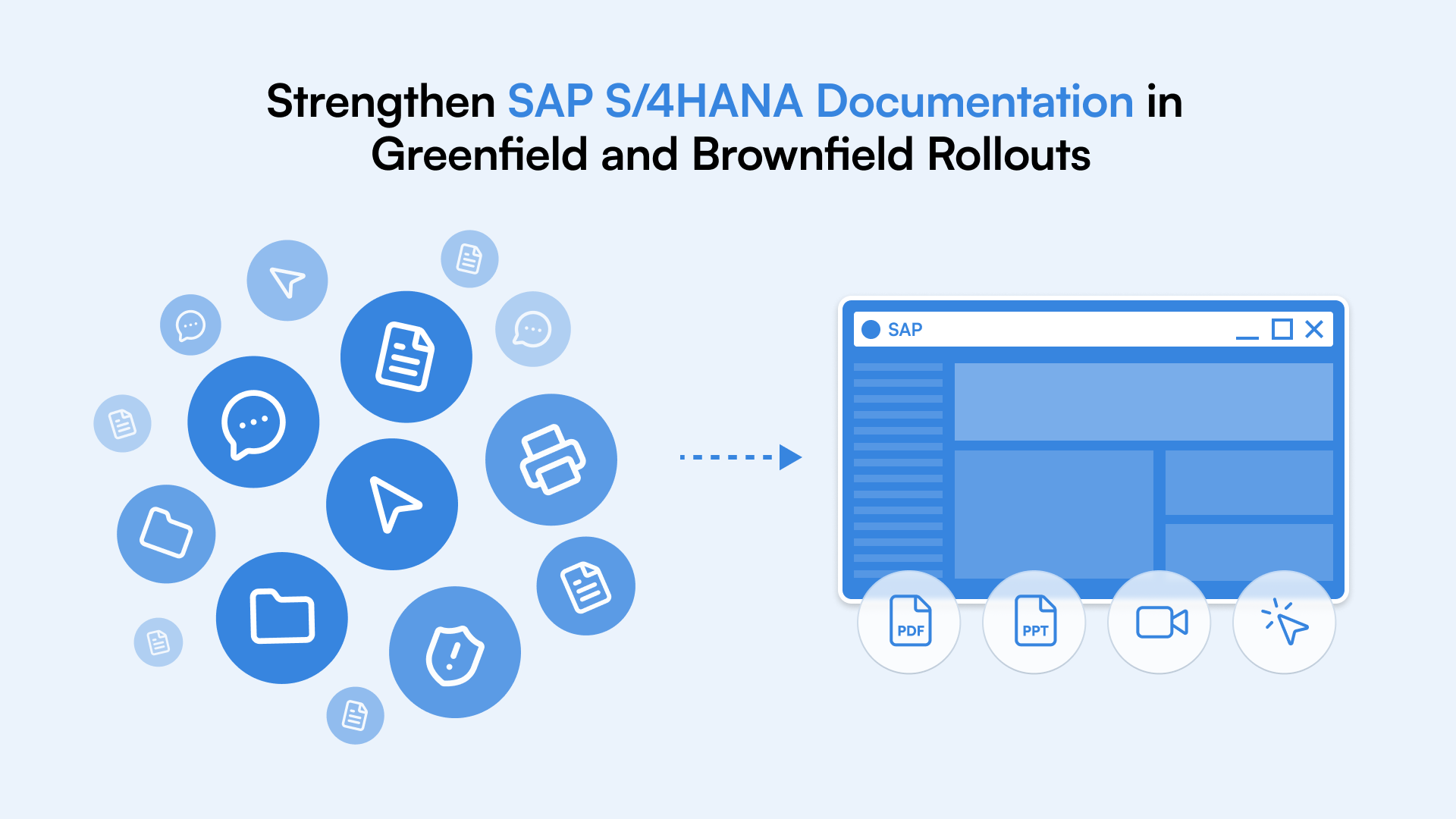
Record Once, Repurpose Everywhere
With ClickLearn, you only need to record a process once. The platform automatically generates SAP documentation in multiple formats – Word, PDF, PowerPoint, videos, and interactive walkthroughs. This saves hours of manual work and ensures that every version of your content tells the same story.
Value insight: One recording can serve training, onboarding, and compliance needs simultaneously, a core advantage of SAP documentation automation.
Auto-Updates When Systems Change
SAP environments evolve continuously, and so should your documentation. When a process changes, ClickLearn updates all related materials automatically. This eliminates version mismatches and ensures your users always have access to the most accurate, up-to-date content.
Value insight: Auto-updating keeps your documentation aligned with live SAP systems, reducing maintenance effort and rework.
Built-In Localisation
For global enterprises, documentation must speak every user’s language. ClickLearn supports multilingual SAP documentation, automatically translating content into more than 40 languages. This guarantees consistency across regions while saving translation time and costs.
Value insight: Built-in localisation helps teams deliver a consistent user experience worldwide – from Europe to Asia to the Americas.
Role-Based Training and In-App Guidance
ClickLearn goes beyond static manuals. It delivers in-app guidance that supports users in real time, showing them exactly what to do as they work. Combined with role-based training, it ensures every employee gets content tailored to their job, making learning intuitive and immediate.
Value insight: Contextual learning improves engagement and helps users adopt new SAP workflows faster and more confidently.
Trackable Engagement and Analytics
Knowing which materials are used – and which aren’t – gives you valuable insight into adoption. ClickLearn offers user adoption analytics that track engagement across documentation, allowing you to refine training and focus support where it’s needed most.
Value insight: With visibility into how employees interact with training, you can measure impact, optimise learning paths, and continuously improve content quality.
Key Takeaway
ClickLearn standardises SAP documentation across teams and languages. As a leading SAP documentation automation tool, it helps organisations create, update, and distribute training content seamlessly throughout international SAP rollouts.

Measuring the ROI of Documentation Automation
The success of SAP documentation automation lies in measurable results, reduced manual effort, faster onboarding, and stronger user adoption. Tracking these outcomes proves real ROI while improving long-term knowledge retention and fostering continuous learning within SAP environments.
Reduced Manual Effort
Automating your documentation process can lead to a 70% reduction in manual effort, freeing teams from repetitive updates and formatting tasks. This improves both delivery speed and overall training efficiency, helping projects meet their timelines without added pressure.
Value insight: Automation shifts documentation from being a reactive task to a continuous improvement asset, contributing directly to documentation automation ROI.
Faster Onboarding
Accurate, ready-to-use materials make onboarding faster and more engaging. Companies that automate documentation see up to 40% improvement in onboarding speed and measurable gains in SAP user adoption metrics.
Value insight: Clear, role-based learning paths shorten the time to productivity, ensuring new users adapt quickly to the system.
Lower Support Load
With reliable guides and in-app help, users rely less on support teams. Many organisations report a 50% drop in support tickets post-launch, reflecting the power of clear, up-to-date training materials.
Value insight: Strong documentation directly supports post-go-live optimisation, improving stability and reducing reactive troubleshooting.
Improved Compliance and Audit Readiness
Automation adds control and transparency. Every document is traceable, versioned, and aligned with current processes, improving audit readiness and compliance visibility.
Value insight: Audit-ready documentation reinforces governance and ensures every system change is properly documented and verifiable.
Key Takeaway
Measuring documentation automation ROI is simple: 70% less manual work, 40% faster onboarding, and 50% fewer support tickets. Improved compliance and stronger SAP user adoption metrics show how automation enhances training efficiency and drives continuous post-go-live optimisation.
Conclusion: Protect Your Go-Live with a Strong SAP Documentation Strategy
Whether your organisation follows a Greenfield or Brownfield path, clear, accurate, and current documentation is essential for lasting SAP user adoption, compliance, and measurable ROI.
With the right SAP S/4HANA documentation strategy, teams stay aligned, processes remain transparent, and every change is captured in real time. When automation, continuous updates, and in-app learning work together, documentation becomes a living part of your ERP ecosystem, not an afterthought.
Enterprises that invest in structured documentation don’t just complete implementations; they achieve true ERP success, where technology and people move forward together from day one.
FAQs
Documentation problems often arise when process guides are outdated, scattered, or lack ownership. A structured SAP S/4HANA documentation strategy ensures consistency, version control, and smoother knowledge transfer across teams.
Documentation automation keeps content accurate by recording SAP workflows and updating guides automatically as processes change. This saves time, improves training efficiency, and supports long-term SAP user adoption.
Establish clear ownership, approval workflows, and version control through a strong documentation governance framework. This makes your content audit-ready and ensures compliance across every stage of migration.
In a Greenfield implementation, documentation starts from scratch and grows with each sprint. In a Brownfield migration, teams must audit and update existing materials to align with new workflows for accuracy and consistency.
Platforms like ClickLearn automate SAP documentation by recording processes once and generating multilingual, role-based training materials. This enhances engagement, speeds up onboarding, and ensures documentation stays up to date.