
According to Gartner, approximately 55% to 75% of ERP projects fail to meet their objectives. The reasons are rarely technical. Most failures trace back to poor change management and inadequate training.
That should shift how you think about ERP rollout.
Companies invest in platforms like Acumatica to gain control, visibility, and operational efficiency. But software alone does not deliver ROI. Adoption does. And adoption depends on structured **Acumatica training**.
When **Acumatica software training** is treated as a strategic initiative, not a checkbox activity, outcomes change:
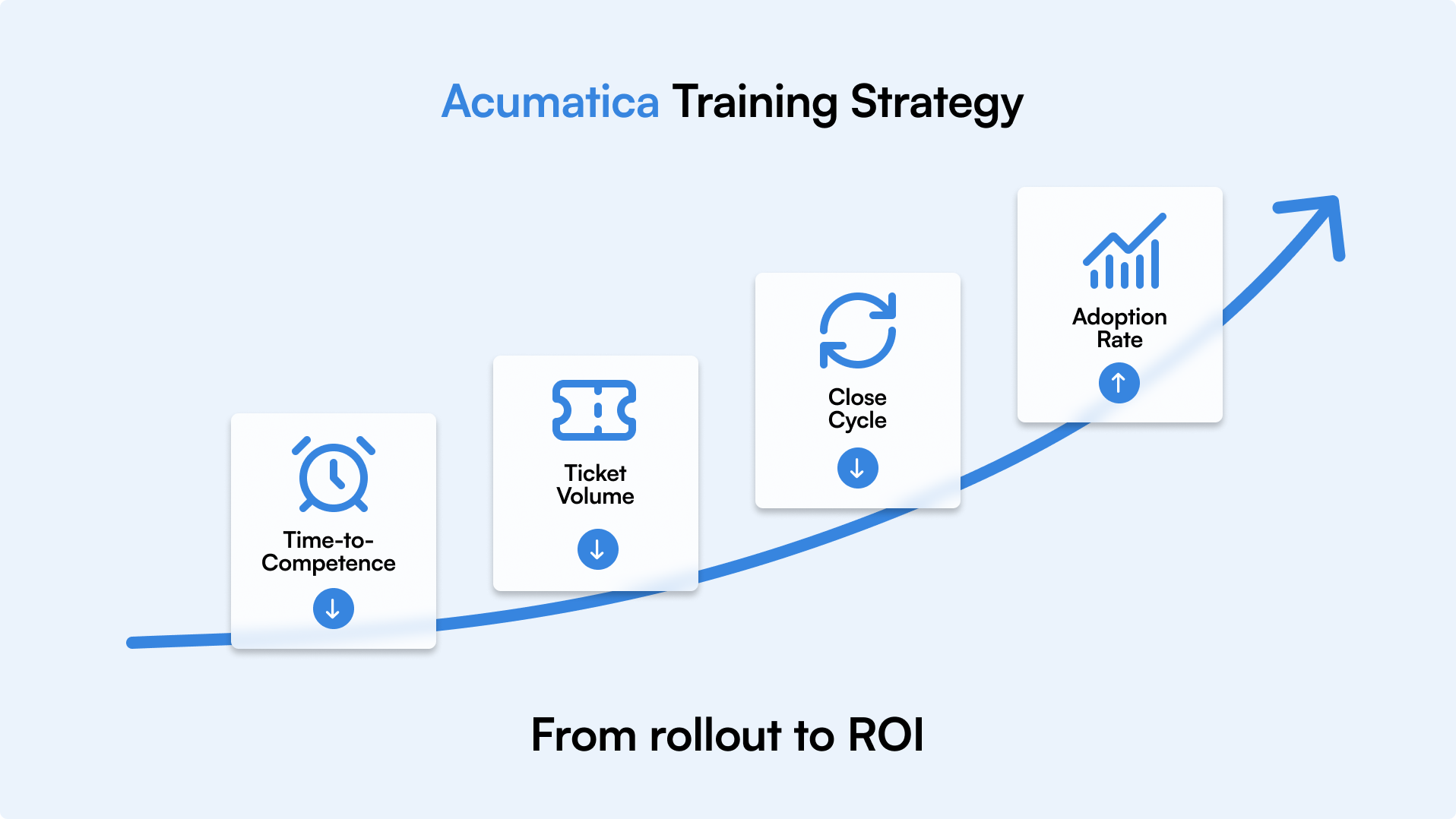
- Time to competence decreases
- Process errors reduce
- Support tickets decline
- Teams gain confidence faster
When training is rushed or generic, the opposite happens. Users depend on shortcuts. Workarounds become standard practice. Finance teams struggle with closing cycles. Operations teams question data accuracy. Leadership questions the investment.
Training must connect directly to business outcomes.
If your priority is faster financial reporting, training should focus on finance workflows.
If inventory accuracy drives performance, warehouse processes must be prioritized.
If scaling operations is the goal, onboarding needs structure and repeatability.
This is not about one-time sessions or static documentation. It is about building a scalable system that supports onboarding, continuous improvement, and measurable impact.
An effective Acumatica training strategy aligns:
- Business KPIs
- Role-based workflows
- Structured learning paths
- Performance analytics
Get this right, and you accelerate adoption. Get it wrong, and even the best ERP system underperforms.
Let’s break this into 11 practical steps you can implement across your organization.
Step 1: Define Business Outcomes and KPIs
Before you design any Acumatica training program, define what success looks like.
This is where many teams get it wrong. They start building training content before agreeing on business outcomes. The result? Lots of material, little measurable impact.
Training should not begin with modules. It should begin with metrics.
What Business Outcome Are You Driving?
Ask leadership a direct question:
What must improve since we implemented Acumatica?
Common answers include:
- Reduce the month-end close from 10 days to 5
- Improve inventory accuracy from 92 percent to 98 percent
- Shorten order processing time
- Reduce manual journal entries
- Improve project margin visibility
Each of these outcomes requires specific user behaviors inside Acumatica. Your training must support those behaviors.
Which KPIs Should You Track
Tie your Acumatica training directly to operational KPIs. Focus on measurable performance indicators such as:
Adoption Metrics
- Time-to-competence for new users
- Training completion rates
- Active system usage by role
Operational Metrics
- Error rates in transactions
- Rework frequency
- Ticket volume related to user mistakes
Financial Metrics
- Days to close
- Inventory write-offs
- Revenue leakage
When you align training with these metrics, it becomes a performance driver, not a support function.
Make KPIs Visible From Day One
Set baseline numbers before rollout. Measure again at 30, 60, and 90 days. Review quarterly.
If support tickets drop by 25 percent after targeted finance training, that is ROI.
If onboarding time drops from 6 weeks to 3 weeks, that is a measurable impact.
Without defined KPIs, even strong Acumatica software training feels subjective. With KPIs, it becomes strategic.
Now that outcomes are clear, the next step is identifying exactly who needs what training inside the system.
Step 2: Map Roles and Critical Processes
If everyone receives the same training, no one gets the right training.
That is why role mapping is the foundation of scalable, role-based Acumatica training.
Acumatica touches finance, inventory, sales, projects, and manufacturing. Each function interacts with different modules, workflows, and transactions. Training must reflect that reality.
Start with role clarity!
List every user group that interacts with Acumatica. Be specific.
Examples:
- Accounts Payable Specialist
- Accounts Receivable Clerk
- Controller
- Inventory Manager
- Warehouse Operator
- Sales Operations
- Project Manager
- Production Planner
Now ask one simple question for each role:
What critical processes does this person execute inside Acumatica every week?
Map Modules to Roles
Do not think in terms of system features. Think in terms of operational workflows.
For Finance teams, this may include:
- Vendor bill entry
- Payment processing
- Customer invoicing
- Cash application
- Journal entries
- Financial reporting
This is where Acumatica software training for finance teams must go deep, not broad. Finance users do not need warehouse workflows. They need precision in accounting processes.
For Inventory and Warehouse roles:
- Purchase order receipts
- Inventory adjustments
- Transfers between locations
- Cycle counting
- Reorder point management
For Sales teams:
- Sales order creation
- Pricing updates
- Customer management
- Shipment tracking
For Project and Manufacturing roles:
- Project budget tracking
- Time entry
- Production order management
- Bill of materials updates
Each workflow contains critical transactions. Those transactions define what must be mastered.
Identify High-Risk Transactions
Not all actions inside Acumatica carry equal impact.
Focus training on:
- Transactions that affect financial statements
- Processes that impact customer delivery timelines
- Actions that change inventory valuation
- Entries that create compliance risk
- These are non-negotiable training priorities.
When you build role-based Acumatica training, users learn what matters to their performance, not generic system navigation.
Document the Process Flow
For each role, map:
- Trigger event
- Steps inside Acumatica
- Decision points
- Output or report generated
This gives you clarity on what your training content must cover. It also highlights gaps where users often make mistakes.
Once roles and processes are clearly mapped, you can assess skill gaps and design training that fits real-world users, not theoretical workflows.
That is where we go next.

Step 3: Assess Skills and Create Learner Personas
You cannot design effective Acumatica training if you do not understand who you are training.
This is where an Acumatica training needs assessment becomes critical. Not everyone starts at the same level. Not everyone learns the same way. Not everyone adapts at the same speed.
Treat your users as distinct groups, not one audience.
Identify Current Skill Levels
Start with a simple classification:
- First-time ERP users
- Experienced ERP users new to Acumatica
- Advanced users migrating from a legacy system
- Power users and future champions
A beginner may need structured navigation training, terminology basics, and guided simulations.
An experienced user may only need process differences, reporting workflows, and exception handling.
If you deliver the same Acumatica software training to both groups, you either overwhelm beginners or bore experienced users. Neither drives adoption.
Evaluate Work Environment
Your delivery model should reflect how your teams operate.
Are users:
- Fully remote
- Hybrid
- On-site
- Distributed across multiple locations
Remote teams may benefit from microlearning modules and on-demand simulations.
On-site teams may combine instructor-led sessions with in-app guidance.
The environment affects format. Format affects retention.
Measure Change Readiness
This part is often ignored.
Some users are excited about the new system. Others are resistant. Both require different approaches.
Ask:
- Do users understand why Acumatica was implemented?
- Do they see personal value in the change?
- Are managers reinforcing adoption?
Low readiness means training must include context and communication, not just system steps.
Build Simple Learner Personas
You do not need complex documentation. Keep it practical.
For each role group, define:
- Skill level
- Common challenges
- Daily tasks inside Acumatica
- Preferred learning format
- Level of change acceptance
For example:
Finance Persona – Intermediate ERP User
- Comfortable with accounting systems
- Concerned about month-end accuracy
- Needs deep transaction training
- Prefers structured SOPs and reporting guides
Warehouse Persona – Beginner ERP User
- Limited system exposure
- Task-focused
- Needs step-by-step simulations
- Benefits from visual microlearning
These personas guide how you design scalable Acumatica training that fits real users.
When you understand skill gaps and user behavior, you can confidently choose the right training modalities. That is the next step.
Step 4: Choose Training Modalities
If Step 1 defined outcomes and Step 2 mapped roles, this step decides how learning will actually happen.
There is no single best format. The right approach depends on user role, system complexity, and operational urgency.
Strong modern Acumatica training methods combine multiple modalities. The goal is not more content. The goal is to deliver the right content at the right time.
Let’s break down the main options.
1. In-App Guidance
This is learning in the flow of work.
Instead of sending users to a separate portal or PDF, guidance appears directly inside Acumatica while they perform tasks.
Best for:
- High-frequency workflows
- Complex transactions with multiple decision points
- Reducing support tickets
Benefit:
Users learn while doing. This shortens time-to-competence and immediately reduces errors.
For operational teams under time pressure, this format often drives the fastest adoption.
2. Microlearning
Microlearning breaks content into short, focused lessons.
Think:
- 3 to 5 minute task-based videos
- Single-process walkthroughs
- Quick reference guides
Best for:
- Busy teams
- Remote users
- Just-in-time refreshers
Microlearning works well when combined with searchable content libraries.
If you are planning video-based modules, review this guide on How to create Acumatica training videos:
Well-structured videos improve clarity and reduce repeated questions.
3. Simulations
Simulations allow users to practice workflows in a safe environment.
Users can:
- Enter transactions
- Complete process flows
- Experience system logic
- Make mistakes without real consequences
Best for:
- New system rollouts
- High-risk financial transactions
- Manufacturing and inventory processes
- Simulations build confidence before users operate in live production.
4. SOP Documentation
Standard operating procedures remain essential.
Clear, structured documentation supports:
- Compliance
- Audit readiness
- Process consistency
- Cross-team standardization
However, static documents alone are not enough. They should complement interactive training, not replace it.
When building scalable Acumatica software training, documentation must be version-controlled and aligned with release cycles.
5. Instructor-Led Sessions
Live training sessions still have value, especially during initial rollout.
Best for:
- Leadership alignment
- Complex cross-functional workflows
- Q and A discussions
The limitation? Retention drops if content is not reinforced later.
That is why instructor-led sessions should be supported by microlearning, simulations, and in-app reinforcement.
How to Choose the Right Mix
Do not choose one modality. Build a blended strategy.
For example:
Finance teams:
- Simulation-based practice
- Structured SOPs
- Targeted in-app guidance
Warehouse teams:
- Visual microlearning
- In-app process prompts
Project managers:
- Role-based video modules
- Reporting walkthroughs
The goal is operational enablement, not content volume.
Once you define the delivery mix, the next decision is selecting the right tools and platforms to support scalable execution.
Step 5: Select Tools and Platforms
Once your structure is clear, the next question is practical.
Which Acumatica training tools will support scale, consistency, and long-term governance?
Tool selection determines whether your program stays sustainable or collapses under manual effort.
Let’s evaluate the core components.
1. Acumatica Open University
Acumatica Open University provides structured courses, certifications, and foundational product knowledge.
It is valuable for:
- Standardized system of education
- Product updates and feature overviews
- Formal certification paths
However, the Open University focuses on product functionality. It does not automatically reflect your company’s customized workflows, role-specific configurations, or internal policies.
That is where additional tooling becomes necessary.
2. LMS and SCORM Support
An LMS helps you:
- Assign training by role
- Track completion rates
- Monitor onboarding progress
- Generate compliance reports
If you operate across multiple locations or departments, LMS visibility becomes critical.
SCORM compatibility ensures your Acumatica software training platform can integrate structured learning content into existing HR or training systems.
This layer provides governance and accountability.
But it does not solve content creation challenges.
3. Digital Adoption Platforms
Digital adoption platforms solve a different problem.
They enable you to:
- Record real workflows directly inside Acumatica
- Generate step-by-step guides automatically
- Create simulations
- Deliver in-app guidance
- Keep documentation aligned with system updates
Instead of manually maintaining SOPs every time a process changes, content updates can be automated.
This is especially valuable during biannual Acumatica releases.
If you are evaluating automation options, review how Acumatica integration for automated documentation works here:
Automation reduces documentation effort while improving accuracy.
How To Choose The Right Combination
- Most mid-market companies need a layered approach:
- Open University for structured product learning
- LMS for governance and reporting
- Digital adoption tools for workflow-specific, role-based enablement
When selecting an Acumatica software training platform, ask:
- Can it scale across roles and locations?
- Does it reduce manual documentation work
- Can it support multilingual teams?
- Does it align with release cycles?
- Can it measure time-to-competence?
Tooling should support your strategy, not define it.
With platforms in place, the next step is designing clear, role-based learning paths that translate your process maps into structured curricula.
Resources
New webinars, events and blogposts

Webinar

Event
Blog
Step 6: Build Role-Based Learning Paths
Generic training creates generic results.
If you want measurable adoption, you need role-based Acumatica training that reflects how each function actually uses the system.
A Controller does not need warehouse workflows. A Production Planner does not need accounts receivable processes. Precision matters.
Here is how to structure learning paths by function.
Finance Learning Path
Finance teams operate in high-risk, compliance-sensitive workflows. Accuracy is non-negotiable.
Focus areas:
- Chart of accounts structure
- Vendor bill entry and approvals
- Customer invoicing and cash application
- Journal entries and adjustments
- Month-end close process
- Financial reporting and dashboards
Training format mix:
- Simulation-based practice for transactions
- Structured SOP documentation
- In-app guidance for high-impact entries
Success metrics:
- Reduced days to close
- Lower rework rate
- Fewer accounting-related support tickets
Inventory and Warehouse Learning Path
Inventory teams operate in real time. Delays and errors directly impact fulfillment.
Focus areas:
- Purchase order receipts
- Inventory transfers
- Cycle counting
- Adjustments and corrections
- Reorder point management
Training format mix:
- Visual microlearning
- Task-based walkthrough videos
- In-app prompts for complex transactions
Success metrics:
- Inventory accuracy percentage
- Reduced adjustment frequency
- Faster transaction processing
Sales and Order Management Learning Path
Sales teams need speed and visibility.
Focus areas:
- Sales order creation
- Pricing and discount management
- Customer account updates
- Shipment tracking
- Order fulfillment workflows
Training format mix:
- Short task-based modules
- Process flow simulations
- Reporting walkthroughs
Success metrics:
- Reduced order processing time
- Lower-order entry errors
- Faster quote-to-cash cycle
Project Management Learning Path
Project teams rely on accurate data to protect margins.
Focus areas:
- Project setup and budgeting
- Time and expense entry
- Revenue recognition
- Cost tracking
- Project performance reporting
Training format mix:
- Scenario-based simulations
- Reporting tutorials
- Advanced workflow training
Success metrics:
- Improved project margin visibility
- Reduced billing delays
- Accurate cost allocation
Manufacturing Learning Path
Manufacturing workflows are structured and sequential. Errors compound quickly.
Focus areas:
- Bill of materials management
- Production order creation
- Work order tracking
- Material consumption recording
- Production cost analysis
Training format mix:
- Guided simulations
- Step-by-step process documentation
- In-app validation prompts
Success metrics:
- Reduced production variances
- Fewer manual corrections
- Improved throughput visibility
Suggested Learning Path Structure
Below is a simple structure you can use to design each curriculum:
Core Workflows
Training Format
Duration
KPI Target
AP, AR, GL, Close
Simulation + SOP + In-app
3 to 4 weeks
Close cycle reduction
Receiving, Transfers
Microlearning + In-app
2 to 3 weeks
Accuracy improvement
Order entry, Pricing
Video + Simulation
2 weeks
Order speed
Projects
Budget, Billing
Simulation + Guides
3 weeks
Margin accuracy
Manufacturing
Production, BOM
ERP and process adoption
3 to 4 weeks
Variance reduction
This structure keeps your Acumatica software training organized, measurable, and aligned with operational impact.
When learning paths are clearly defined, content creation becomes structured rather than reactive.
That is where the next step comes in, establishing a scalable content production workflow.

Step 7: Establish a Content Production Workflow
This is where most Acumatica training programs break.
Teams design strong learning paths. They launch onboarding. Then six months later, content is outdated, inconsistent, and impossible to maintain.
If you want scalable Acumatica software training, you need a structured ERP training documentation workflow.
Not more content. Better process. Let’s break this into practical steps.
1. Record from Subject Matter Experts
Your best training content already exists inside your organization.
It lives with:
- Finance leads
- Operations managers
- Warehouse supervisors
- Project controllers
Instead of asking SMEs to write documentation manually, record their real workflows inside Acumatica.
Have them:
- Perform daily transactions
- Explain decision points
- Highlight common mistakes
- Show exception handling
Recording real workflows ensures accuracy. It also reduces the burden on SMEs.
This step prevents generic training that does not match configured processes.
2. Define Review Cycles
Content without review becomes risky.
Establish a structured review process:
- SME validation for technical accuracy
Process owner approval
- Compliance review if needed
- Final training team sign-off
Set clear timelines.
For example:
- Draft review within 5 business days
- Final approval within 10 business days
Ownership must be defined. If no one owns the content, it decays.
3. Implement Version Control
Acumatica has biannual releases. Your training must reflect that.
Without version control:
- Old screenshots remain in circulation
- Process steps become inaccurate
- Users lose trust in documentation
Maintain:
- Version numbers
- Release alignment notes
- Archive history
- Change logs
Every content asset should clearly state which system version it supports.
4. Plan for Localization and Multilingual Needs
If your organization operates across regions, language matters.
Your training workflow should allow:
- Quick translation updates
- Consistent terminology
- Region-specific compliance notes
Manual translation workflows slow everything down. Automation improves speed and consistency.
This is where ERP training content automation becomes critical.
When documentation is generated directly from recorded workflows, updates and translations become significantly easier to manage.
If you want to explore how automation simplifies this process, review how ClickLearn supports Acumatica documentation here:
Automation reduces maintenance effort while improving consistency across roles and locations.
5. Define Governance and Ownership
Governance protects your ERP investment.
Define:
- Who owns the training content per module
- Who approves updates
- How often is content reviewed
- How updates are communicated
Quarterly review cycles work well for most organizations. Major updates should align with Acumatica release schedules.
Governance transforms training from a one-time project into a managed operational asset.
Why this Step Matters
Without a defined content production workflow:
- Documentation becomes outdated
- SMEs get overwhelmed
- Training consistency declines
- Adoption slows
With a structured workflow:
- Updates are predictable
- Roles remain aligned
- Release cycles are manageable
- Training scales across departments
Scalable Acumatica training depends on operational discipline behind the scenes.
Now that production is structured, the next step is launching effectively with a clear 30-60-90-day onboarding plan.
Step 8: Launch with a 30-60-90 Day Onboarding Plan
Onboarding is where adoption either accelerates or stalls.
If new users are overwhelmed in week one, confidence drops. If they are under-trained by month two, errors increase. A structured Acumatica onboarding training plan prevents both extremes.
A 30-60-90 day framework creates clarity, accountability, and measurable progress.
Let’s break it down.
First 30 Days: Core Navigation and Daily Workflows
The first month is about confidence.
Users should learn how to navigate Acumatica and complete their most frequent daily tasks. Do not overload them with advanced features.
Focus on:
- System navigation and dashboards
- Role-specific daily transactions
- Basic approvals and workflows
- Standard reports used in their function
For example:
Finance users should master vendor bills and customer invoices.
Inventory users should complete receipts and transfers accurately.
Sales users should be able to confidently create and process orders.
Training formats during this phase:
- Guided simulations
- In-app prompts
- Short microlearning modules
- Daily task checklists
Goal for Day 30:
- Users complete core workflows without
- supervision
- Support tickets related to basic navigation have decreased
- Managers confirm operational independence
- This phase builds foundational competence.
Days 31 to 60: Advanced Transactions and Reporting
Month two moves from basic execution to operational depth.
Now users expand into:
- Exception handling
- Complex transactions
- Approval escalations
- Advanced reporting and analytics
- Cross-functional process visibility
Finance teams may focus on reconciliation workflows and reporting accuracy.
Project managers may analyze margin reports and cost tracking.
Manufacturing users may handle production variances and material consumption.
Training formats during this phase:
- Scenario-based simulations
- Role-based workshops
- Reporting deep dives
- KPI alignment sessions
Goal for Day 60:
- Users understand not only how to complete tasks, but why they matter
- Reporting accuracy improves
- Process bottlenecks become visible
This phase strengthens operational maturity.
Days 61 to 90: Optimization and Exceptions
By month three, users should move beyond execution and into optimization.
Focus shifts to:
- Process improvements
- Workflow efficiency
- Automation opportunities
- Error reduction
- Cross-department coordination
Encourage users to identify:
- Repetitive manual steps
- Delays in approvals
- Frequent transaction errors
This is also when power users and future champions emerge.
Training formats during this phase:
- Optimization workshops
- Advanced system features
- Continuous improvement sessions
- Peer knowledge sharing
Goal for Day 90:
- Reduced error rates
- Lower support dependency
- Clear improvement ideas
- Identified internal champions
Why the 30-60-90 Model Works
This model prevents information overload. It aligns learning with real-world progression.
Instead of a single training event, you create a structured adoption journey.
It also makes measurement easier:
- Day 30 – Task independence
- Day 60 – Reporting accuracy
- Day 90 – Performance improvement
When onboarding is structured, Acumatica training becomes predictable, measurable, and scalable.

Step 9: Enable Change Management and Champions
Even the best Acumatica training will struggle without structured change management.
Technology change is not just operational. It is behavioral. If managers do not reinforce adoption, users revert to old habits. If leadership is silent, urgency fades.
Strong Acumatica user adoption requires visible sponsorship and internal ownership.
Secure Executive Sponsorship
Adoption improves when leadership connects Acumatica to business priorities.
Executives should clearly communicate:
- Why was the system implemented
- What outcomes are expected
- How success will be measured
This alignment reduces resistance. It also positions training as a strategic initiative, not an IT project.
When leadership references KPIs in town halls or reviews system usage metrics, adoption becomes part of the performance culture.
Identify Super Users
Super users bridge the gap between training and operations.
These are experienced team members who:
- Understand workflows deeply
- Are comfortable with system navigation
- Can coach peers informally
- Provide feedback on process gaps
Select them early. Train them ahead of wider rollout. Involve them in testing and feedback cycles.
Super users reduce dependency on IT and accelerate real-world problem solving.
Build a Champion Network
Champions amplify momentum across departments.
They help:
- Reinforce best practices
- Share success stories
- Surface improvement opportunities
- Encourage accountability
This network becomes especially valuable in remote or multi-site environments where centralized oversight is limited.
Establish a Communication Cadence
Adoption weakens when communication stops.
Set a regular cadence:
- Monthly adoption updates
- KPI dashboards
- Release impact briefings
- Training refresh announcements
Keep communication focused on outcomes, not features.
For example, instead of saying, “New reporting capability added,” say, “New reporting update reduces manual reconciliation time.”
That framing reinforces business value.
Change management is not a one-time activity. It is an ongoing discipline that supports long-term Acumatica user adoption.
Now that adoption is supported culturally, the next step is measuring impact and continuously optimizing your training strategy.
Step 10: Measure, Iterate, and Optimize
If you are not measuring your Acumatica training, you are guessing.
Training must move from activity-based reporting to performance-based reporting. Completion rates alone do not prove adoption. Business impact does.
This is where Acumatica training analytics becomes essential.
Start with Time-To-Competence
Time-to-competence is one of the clearest indicators of training effectiveness.
Ask: How long does it take a new user to complete their core workflows independently?
Measure this before and after implementing structured Acumatica software training.
If onboarding drops from 6 weeks to 3 weeks, that is measurable ROI. Faster productivity directly impacts operational performance.
Track Ticket Deflection
Support tickets reveal where training gaps exist.
Monitor:
- Number of user-error tickets
- Repeat process questions
- Navigation-related issues
If targeted role-based training reduces finance-related tickets by 30 percent, that is not just an operational improvement. It is a cost savings.
Ticket deflection is a practical KPI that leadership understands.
Monitor Completion and Usage
Completion rates still matter, but only when connected to usage.
Track:
- Role-based training completion
- Active system usage by module
- Frequency of critical transaction execution
High completion with low usage signals disengagement. High usage with low error rates signals effective adoption.
Measure Process Accuracy
Training must improve operational precision.
Evaluate:
- Error rates in journal entries
- Inventory adjustment frequency
- Rework the order processing
- Reporting discrepancies
Declining error trends confirm that learning is translating into performance.
KPI Framework for Acumatica Training
Below is a simple framework you can implement:
Category
KPI
What It Tells You
Adoption
Time-to-competence
Speed of onboarding
Support
Ticket deflection rate
Training effectiveness
Engagement
Completion + active usage
User participation
Accuracy
Process error rate
Operational impact
Financial
Close cycle duration
Business ROI
This framework keeps your training strategy aligned with measurable outcomes.
Iterate Based on Data
Analytics should drive refinement.
If warehouse errors remain high, revisit simulation depth.
If reporting mistakes persist, add targeted microlearning.
If completion rates drop, adjust the delivery format.
Optimization is continuous. Acumatica evolves. Processes evolve. Your training must evolve with them.
Measurement transforms Acumatica training from a support function into a performance driver.
Next, we align your training strategy with Acumatica’s biannual release cycles to protect long-term accuracy and scalability.

Step 11: Maintain with Acumatica Release Cycles
Acumatica releases major updates twice a year. If your training does not keep up, accuracy declines fast.
Many organizations invest heavily in rollout, then ignore maintenance. Six months later, screenshots are outdated, workflows have changed, and users lose trust in the documentation.
That is how adoption slowly erodes.
Strong Acumatica release updates training protects your ERP investment long term.
Align Training with Biannual Releases
Every time Acumatica publishes updates, your team should ask:
- Did any workflows change?
- Were navigation paths updated?
- Were fields added or removed?
- Did reporting logic shift?
Even small UI adjustments can confuse users. A structured review process after biannual Acumatica updates prevents disruption.
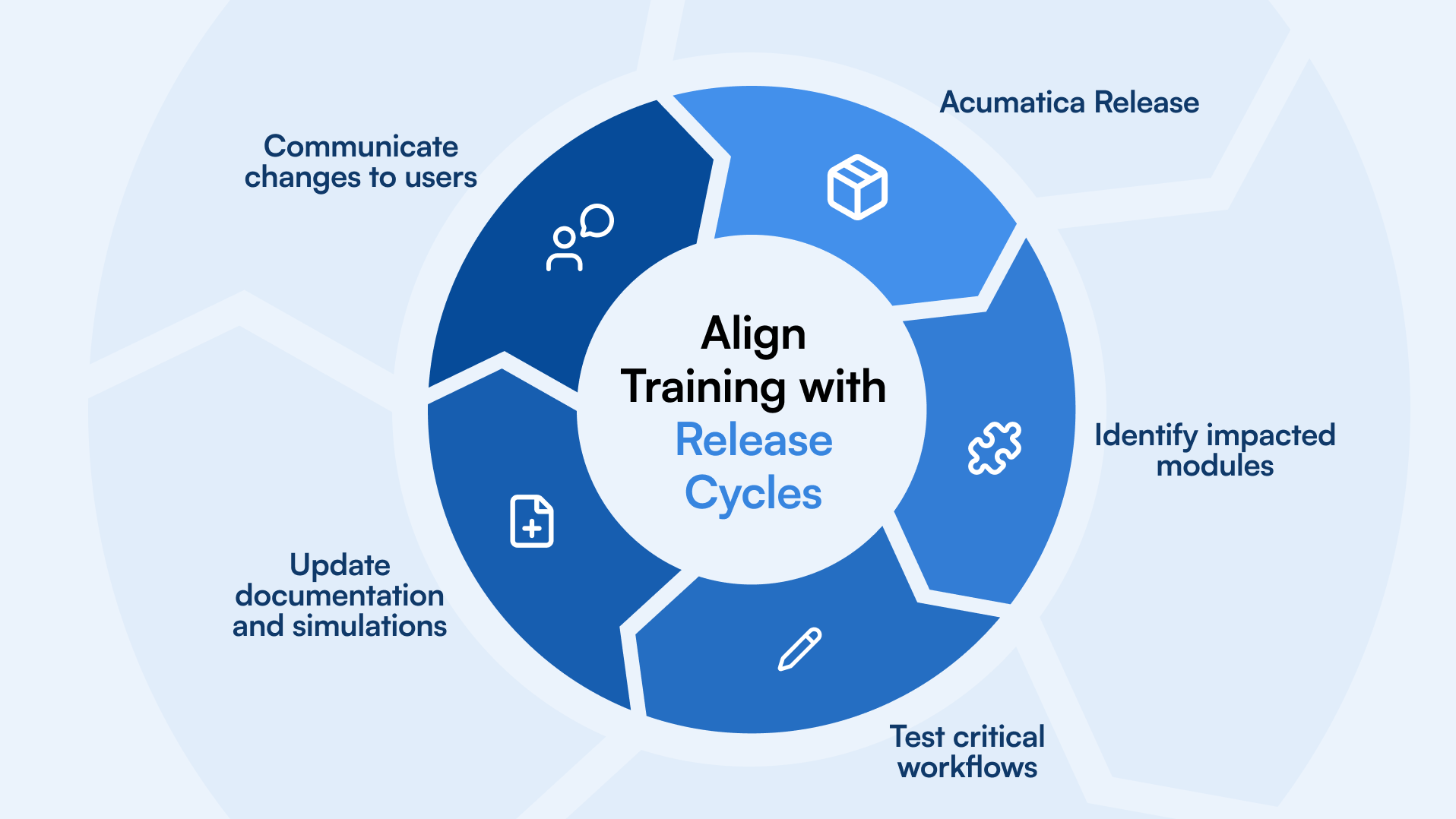
Create a release checklist:
- Review release notes
- Identify impacted modules
- Test critical workflows
- Update documentation and simulations
- Communicate changes to users
This keeps your training ecosystem stable.
Implement Version Tracking
Every training asset should clearly state:
- Supported Acumatica version
- Last review date
- Owner
Version tracking avoids content duplication and confusion. It also supports audit readiness and governance.
If users know documentation reflects the current system version, confidence increases.
Refresh Simulations And In-App Guidance
Simulations and interactive guides must mirror the live system.
After each release:
- Re-record impacted workflows
- Validate decision points
- Update field-level instructions
- Retest advanced transactions
This is where automation significantly reduces maintenance effort. If your content is generated directly from recorded workflows, updates become faster and more reliable.
Communicate Updates Proactively
Do not assume users will discover changes.
Share:
- Release impact summaries
- Updated learning modules
- Short refresher microlearning
- Champion briefings
Position updates as operational improvements, not system changes.
For example, instead of saying, “The interface changed,” say, “This update reduces manual reconciliation steps.” That framing keeps adoption aligned with performance goals.
5 Common Pitfalls and How to Avoid Them
Even well-planned programs fail when execution slips. Most Acumatica training mistakes are not strategic. They are operational.
Here are the most common issues, along with their solutions.
One-time training only
A single launch event is not adoption. Build ongoing reinforcement through microlearning, in-app guidance, and periodic refreshers.
No role differentiation
Generic training can overwhelm users and reduce relevance. Design role-based learning paths aligned to real workflows.
No ownership
If no one owns training content, it becomes outdated. Assign clear module owners and define review cycles.
No analytics
Completion rates alone are not enough. Track time-to-competence, ticket reduction, and process accuracy.
No content governance
Without version control and release alignment, documentation loses credibility. Tie updates to Acumatica release cycles and maintain clear change logs.
Avoid these pitfalls, and your Acumatica training becomes sustainable, measurable, and aligned with business performance.
Quick-Start Checklist
If you need a practical starting point, use this checklist to structure your Acumatica training rollout.
- Define clear business KPIs tied to operational outcomes
- Map roles and identify critical workflows inside Acumatica
- Assess skill gaps and segment users by persona
- Choose the right mix of modalities, in-app guidance, microlearning, simulations, and SOPs
- Select tools that support automation, governance, and LMS tracking
- Build role-based learning paths aligned to performance metrics
- Establish a content production workflow with defined ownership
- Launch with a structured 30-60-90 day onboarding plan
- Assign champions and secure executive sponsorship
- Track time-to-competence, ticket deflection, and process accuracy
- Align training updates with Acumatica release cycles
This checklist keeps your Acumatica training program focused on outcomes, not activities.
You can also turn this framework into a structured rollout plan for your team. If you want a ready-to-use template, we recommend creating a downloadable internal version aligned with your KPIs and workflows.
Ready to Scale your Acumatica Software Training?
If your ERP investment is not delivering the expected ROI, the issue is rarely the software. It is adoption.
Structured, automated, and role-based Acumatica training reduces onboarding time, lowers support costs, and improves operational accuracy. When training aligns with business KPIs, performance follows.
Instead of managing static documents and manual updates, you can automate documentation, generate simulations, and deliver in-app guidance directly inside Acumatica.
If you are ready to:
- Reduce time-to-competence
- Improve process accuracy
- Lower ticket volume
- Scale training across teams and locations
It is time to modernize your approach.
Book a demo and see how scalable Acumatica software training can accelerate adoption and measurable ROI.